
Shopify marketing attribution: how it works, UTM parameters, and order attribution
How Shopify marketing attribution works: how UTM parameters are read, how each order is attributed to a channel, why reports disagree, and how to check your setup.
Shopify marketing attribution assigns credit for an order to the channels a customer visited before buying. The result depends on two things: which visits Shopify was able to record, and which attribution model the report uses.
That's also why Shopify, Meta, Google Ads and Klaviyo can show different results for the same month. Before you move budget because of one of those numbers, it's worth knowing what each report counts, which interactions qualify for credit, and where tracking data goes missing. This post covers all of it: what attribution is, how the tracking works, how UTM parameters feed into it, how Shopify attributes a single order, the limits, and how to set it up properly.
The short answer
Shopify marketing attribution is how Shopify decides which marketing channel gets credit for an order. It works in three steps:
- Shopify records each visit to your online store as a session, using a browser cookie.
- It works out where each visit came from, using the UTM parameters on the link or, if there are none, the referring website.
- When an order comes in, Shopify links it back to that customer's recorded visits (order attribution) and credits it to a channel using the report's attribution model. Shopify looks back 30 days.
By default, marketing activity data uses last non-direct click, and reports that combine sales with a marketing dimension use last click. You can switch to first click, linear or any click.
It works well when your links are tagged properly. It's limited by the same things that limit every browser-based tracker: cookie consent, browser privacy rules, ad blockers and untagged links that end up counted as "direct".
The problem: every platform is grading its own homework
Here's an illustrative month. The numbers are made up, but the shape is one most stores will recognise.
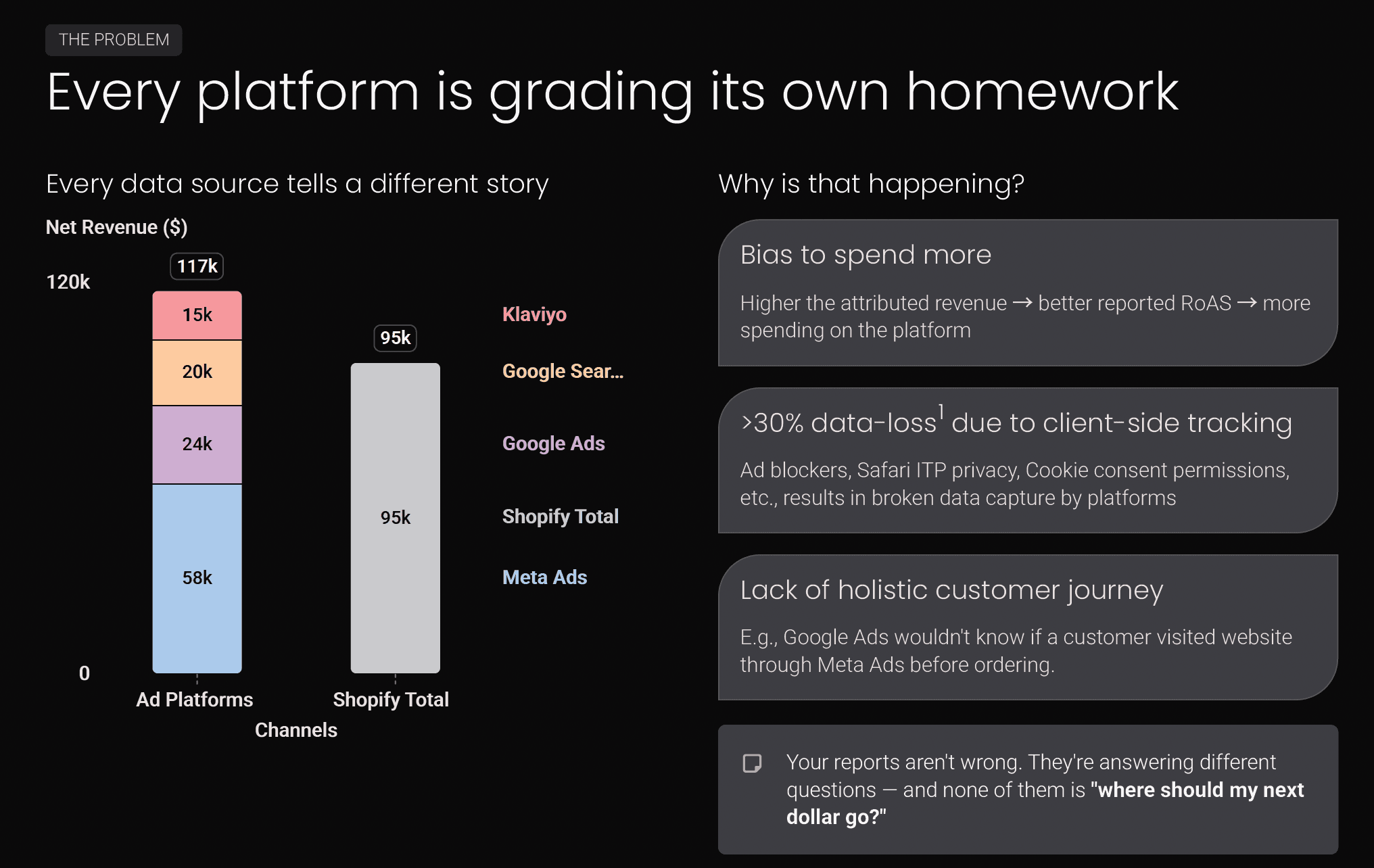
Meta credits itself with $58k. Google Ads with $24k, Google search another $20k, Klaviyo $15k. Together that's $117k of attributed revenue, against $95k of net revenue in Shopify.
Part of that gap isn't attribution at all. Ad platforms report a conversion value (usually the order total they were sent, at the time of purchase), while Shopify's net sales take off discounts, returns and cancellations. Before you compare any two numbers, check they measure the same thing. There's a checklist for that further down.
The rest of the gap comes from three things.
Each platform credits itself, using its own rules. Meta, by default, counts a purchase within 7 days of someone clicking an ad, or 1 day after they viewed one without clicking. Google Ads uses its own conversion window and model. Klaviyo counts orders placed within a few days of an email being opened or clicked. Those rules are all reasonable on their own. They just aren't the same rules, and none of them checks whether another tool already claimed the order.
Browser tracking misses data. Most of this tracking runs in the shopper's browser, and ad blockers, browser privacy features and cookie banners all cut into it. How much gets lost varies a lot by store, audience and region.
No platform sees the whole journey. Google Ads has no idea the shopper first found you through a Meta ad. Meta doesn't know they came back through an email. When three platforms touched the same order, each can count all of it.
So none of these reports is exactly wrong. They're answering different questions. None of them is answering the one you actually care about, which is where your next dollar should go.
What is marketing attribution?
Marketing attribution is the process of deciding which marketing touchpoints get credit for a sale.
A customer rarely buys on their first visit. They might see an Instagram ad, search for your brand a few days later, click an email the next week, and finally buy after typing your URL in. Four touchpoints, one order. Attribution is the set of rules that decides how much of that order each touchpoint earned.
Most models (first click, last click, linear, time decay) split exactly 100% of an order's credit across its recorded journey. If Meta gets 60% of a $100 order, the other channels share the remaining $40, and the channel totals add up to the orders the system could attribute. The exception is any click, which gives every channel involved full credit, so its totals can be higher than your sales. That's deliberate. It answers "which channels showed up in journeys at all?", not "how should I split the money?"
The ad platform numbers above don't add up for a similar reason. They aren't one system splitting one order. They're four separate systems, each giving itself credit.
How attribution tracking works
Before any model can split credit, something has to record the journey. On a Shopify store, that comes down to four pieces.
1. The link carries a label. When someone clicks an ad, an email or a social post, the link usually has extra information on the end. That's either UTM parameters you added yourself (?utm_source=meta&utm_medium=paid_social), or a click ID the ad platform added automatically (gclid for Google, fbclid for Meta, ttclid for TikTok, msclkid for Microsoft).
2. The browser reports where the visitor came from. Even without a tagged link, the browser usually passes along a referrer: the site the visitor was on just before. A visit from instagram.com or google.com can be classified from the referrer alone. A visit with no referrer and no tags gets labelled direct.
3. A cookie ties visits together. The first time someone lands on your store, a tracking script stores an anonymous ID in their browser. Later visits from that browser carry the same ID, so separate visits can be stitched into one journey. Visits are grouped into sessions, which usually end after 30 minutes of inactivity.
4. The order gets linked back to the journey. When the shopper checks out, the tracker connects the order to that ID, looks back over its sessions, and hands the touchpoints to an attribution model.
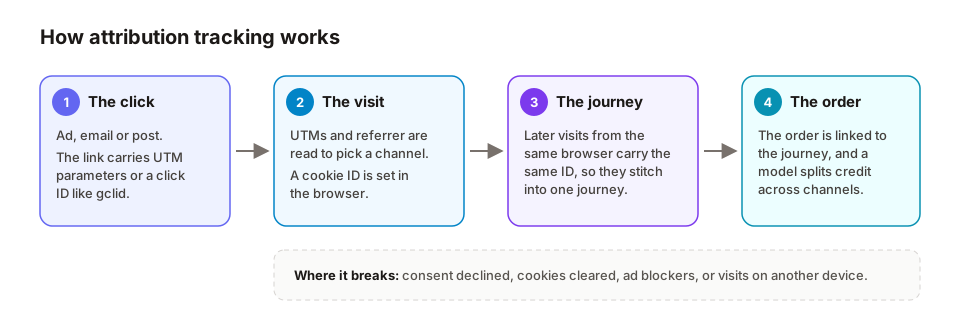
Every attribution tool, Shopify's included, is some version of those four steps. The differences come down to how well each step is done, and which model is used at the end.
How UTM parameters work in Shopify attribution
UTM parameters are the part of this you control directly, and they matter more than most people expect. A bad UTM doesn't throw an error. It quietly turns up as extra "direct" traffic, or as a campaign you can't find in any report.
A UTM-tagged link looks like this:
https://yourstore.com/products/linen-shirt?utm_source=meta&utm_medium=paid_social&utm_campaign=2026-10_autumn-launch&utm_content=video-15sThere are five standard parameters:
| Parameter | What it answers | Example |
|---|---|---|
utm_source | Who sent the traffic? | meta, google, klaviyo |
utm_medium | What kind of traffic is it? | paid_social, cpc, email, sms |
utm_campaign | Which campaign? | 2026-10_autumn-launch |
utm_content | Which ad, creative or link? | video-15s, hero-banner |
utm_term | Which keyword (mostly for search)? | linen shirt men |
utm_source and utm_medium do most of the work, because together they decide which channel the visit belongs to. A visit tagged utm_source=google&utm_medium=cpc is paid search. A visit from google.com with no tags is organic search. Get the medium wrong and the whole visit lands in the wrong channel.
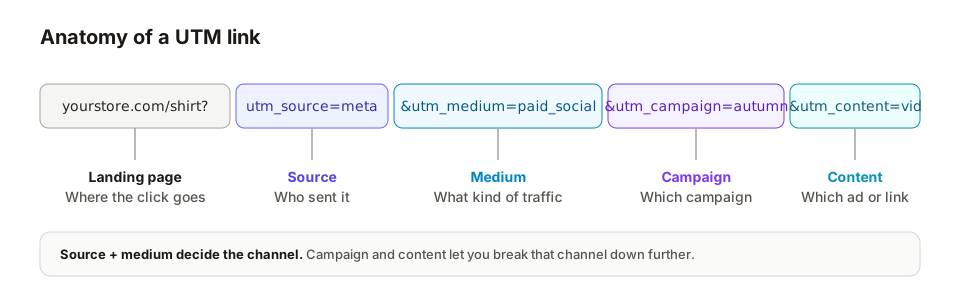
Shopify reads the UTM parameters on the page a visitor lands on and stores them against that visit. That's how externally run campaigns end up in reports like Performance by UTM campaign. If a redirect or link shortener strips the parameters before your store loads, Shopify never sees them.
A few rules that save a lot of pain later:
- Use lowercase, always. Some tools treat
Emailandemailas two different sources. - Pick one naming pattern and write it down.
spring-sale,Spring_Saleandspringsaleend up as three campaigns. - Never put UTMs on your own internal links. A homepage banner tagged
utm_source=klaviyore-labels every visitor who clicks it as an email visitor, halfway through their journey. - Test your links after any redirect or shortener, to check the parameters survive.
Our UTM setup guide has a per-platform cheat sheet with the exact values for each ad platform and email tool.
Attribution models in two minutes
Once the journey is recorded, a model decides how to split the credit.
| Model | How it splits credit | Good for answering |
|---|---|---|
| Last click | 100% to the last touch before purchase | What closed the sale? |
| Last non-direct click | 100% to the last touch that wasn't a direct visit | What closed it, ignoring "direct" gaps? |
| First click | 100% to the first touch | Which channels introduce new customers? |
| Linear | Equal share to every touch | What's a simple, even baseline? |
| Time decay | More credit to touches closer to the purchase | What happened in the run-up to the sale? |
| Any click | 100% to every touch involved | Which channels appear in journeys at all? (Totals can exceed sales) |
None of these is "the correct one". Each answers a different question. We walked one real order through six models in Shopify attribution models, compared if you want to see how differently the same sale gets credited.
The other setting that matters is the attribution window: how far back a touchpoint can be and still get credit. Shopify uses 30 days. Ad platforms set their own, and Meta's default even includes views. Comparing reports with different models and different windows is one of the most common reasons numbers don't match.
The limits of browser-based attribution
Everything above depends on the browser cooperating, and more and more often it doesn't.
- Cookie consent. In regions where consent is required, analytics data is collected only after a visitor accepts. Visitors who decline still place orders, but their visits aren't recorded the same way.
- Browser privacy features. Safari's Intelligent Tracking Prevention limits how long some cookies and website storage can last, in some cases to 7 days or less, depending on how they were set and where the visitor came from. A shopper who clicked an ad two weeks ago can look like a new visitor today.
- Switching devices. Browsing on a phone and buying on a laptop splits one journey across two browsers. Some tools can reconnect them when they recognise the customer, but not every journey can be joined back up.
- Ad blockers. These block many tracking scripts outright.
- In-app browsers. Instagram, TikTok and Facebook open links in their own built-in browsers, which can drop the referrer and keep cookies separate from the phone's main browser.
- External checkouts and redirects. Some express checkouts and third-party checkout apps break the link between the visit and the order.
- "Direct" becomes a catch-all. Any visit the tracker can't explain is counted as direct. On many stores, a good share of "direct" is really untagged email, SMS, WhatsApp or influencer traffic.
- View-through credit. Ad platforms can count a sale when someone only saw an ad. Your store can't see impressions, so it can neither confirm nor dispute those.
None of this makes attribution useless. It means every number is an estimate, and it helps to know which way each one tends to lean.
How Shopify marketing attribution works
Shopify has attribution built into Analytics. Here's how it works, based on Shopify's own documentation.
Sessions are cookie-based. Shopify records a session when someone visits your online store. A session ends after 30 minutes of inactivity, and one person can create many sessions.
Each session gets a source. Campaigns created through Shopify's Marketing section are tracked automatically. External campaigns are tracked through their UTM parameters. Other visits are classified by referrer, and a visit where the customer typed your URL in is counted as direct.
Journeys can span devices. Since March 2023, Shopify's storefront data includes cross-device reporting, so a customer who clicks an Instagram ad on their phone and buys on their laptop can still be credited to the ad. It can't connect every journey, but it's more than a single browser cookie on its own.
Orders are credited using one of five models:
- Last non-direct click (the default for marketing activity): 100% to the last channel before purchase, skipping direct visits.
- Last click (the default when a report combines sales metrics with a marketing dimension): 100% to the last channel, direct included.
- First click: 100% to the first channel, direct included.
- Linear: equal credit to every click in the journey.
- Any click: 100% to every channel the customer clicked.
There's a 30-day window. If a visitor doesn't buy within 30 days of a session, Shopify resets their first interaction. A new order also starts a new journey.
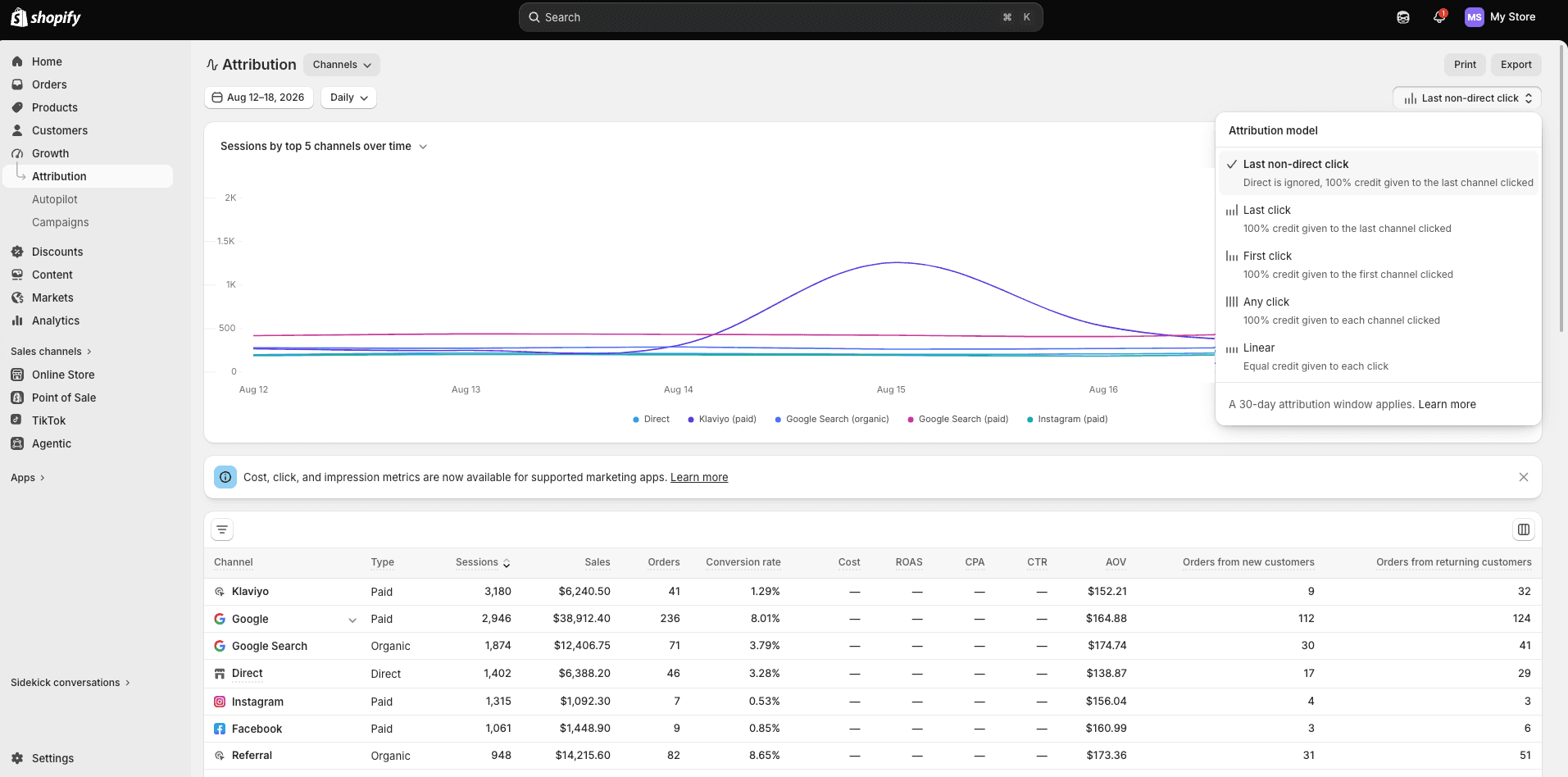
Where to find it. Newer Shopify admins have a dedicated Attribution page (under Growth in the admin below; older admins keep it under Marketing). It lists every channel with its sessions, sales, orders, conversion rate, average order value and new vs returning orders, and the model switcher sits in the top-right corner. Shopify's Analytics reports work too: under Analytics → Reports, reports such as Sales attributed to marketing and Performance by UTM campaign show an Attribution menu in the configuration panel whenever a report combines a sales metric with a marketing dimension. What's available depends on your Shopify plan.
How Shopify attributes a single order
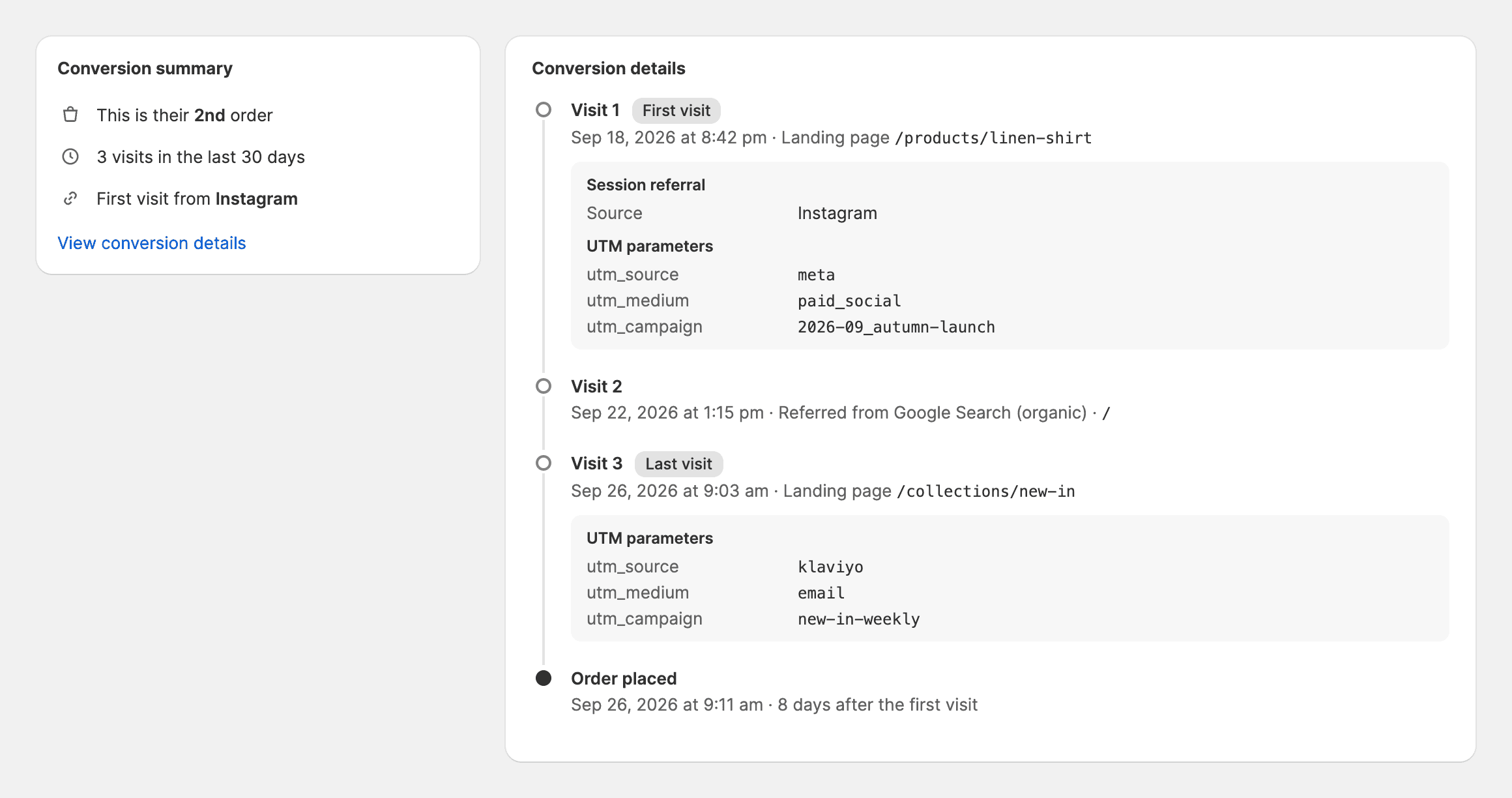
Reports show totals, but attribution happens one order at a time. Each order page has a conversion summary showing what Shopify knows about how that customer arrived: how many orders they've placed, how many times they visited in the last 30 days, and where their first visit came from. From there, View conversion details shows each session, with its referrer and UTM parameters.
That's order attribution in practice. A model reads this journey and decides which channel gets the order. Under last click, the source of the last visit wins. Under first click, the first one does.
The summary isn't always complete, though. Shopify shows a complete, limited or unavailable summary depending on what it could record, and details can take up to 48 hours to appear. When the visits weren't recorded (consent declined, a draft order created by staff, a broken redirect), there's little or nothing to credit, and the order ends up as direct or unattributed.
Where Shopify's attribution falls short
Shopify's attribution is a good free starting point, and it has one big strength: it works from your real orders, so it never invents sales. It still has gaps.
- It depends on recorded sessions. Consent, browser privacy features and ad blockers all mean lost or broken visits. Shopify's own documentation notes that consent banners reduce the session data available to analytics.
- Orders without a recorded journey go to direct or unattributed. The sale is real. Shopify just can't say where it came from.
- It only knows what your links tell it. Untagged Meta ads, email tools with UTM tracking switched off, and influencer links with no tags all fall into the wrong bucket.
- The models are fixed. You get five standard models. You can't build your own or weight channels to fit how your business sells, and campaign and ad-level detail is only as good as your UTMs.
- Cost data is partial. Shopify's Attribution page has Cost, ROAS and CPA columns, but they only fill in for supported marketing apps that send cost data to Shopify. Channels without that integration show a dash, so you can't always compare spend and revenue for every channel on the same page.
- The report doesn't feed the ad platforms. Shopify's attribution report tells you what happened. Separately, Shopify's integrations can share data with ad platforms. The Facebook & Instagram channel, for example, can send purchases to Meta through the Conversions API when data sharing is set to Maximum. Coverage beyond that depends on the platform and on how each integration is set up.
What to check before blaming attribution
When two reports disagree, the instinct is to blame tracking. Often the reports just aren't counting the same thing. Before you change anything, run through this.
Are they counting the same orders?
- Same date range, and the same time zone? A store on Singapore time and an ad account on US Pacific time disagree about which orders belong to "yesterday".
- Same currency? An ad account billed in a different currency from the store will never match without conversion.
- Do they include the same orders? Some reports exclude cancelled orders, test orders, draft orders or point-of-sale orders. Others don't.
Are they measuring the same money?
- Gross sales, net sales and conversion value are different numbers. Check how each handles discounts, refunds, tax, shipping and cancellations.
- Ad platforms usually record the value they were sent at purchase time, and don't update it if the order is later refunded.
Which of three things went wrong?
Once the comparison is like for like, a missing or misattributed sale is one of three separate problems:
- The order wasn't recorded. The tool never knew the sale happened.
- The order was recorded, but its journey couldn't be connected. The tool knows about the sale but can't say where it came from.
- The journey was connected, but credit was split differently. Two tools saw the same journey and used different models or windows.
These have different fixes. A server can confirm that an order happened even when its marketing journey is missing. That fixes the first problem, but it doesn't tell you which campaign deserves the credit. Tagging and journey-stitching fix the second. Picking a model on purpose fixes the third. When you check your tracking, ask the first two questions separately: did the purchase get recorded, and could it be connected to a source?
How to set up Shopify attribution for a better view
Most of the improvement here is free. It's mostly about making sure every link tells Shopify where it came from.
1. Tag every paid ad.
-
Meta Ads: Meta doesn't add UTMs on its own. In Ads Manager, open the ad, scroll to Tracking, and fill in URL parameters, for example:
utm_source=meta&utm_medium=paid_social&utm_campaign={{campaign.name}}&utm_content={{ad.name}}&utm_id={{campaign.id}}The
{{...}}values are Meta's dynamic parameters, so each ad fills in its own campaign and ad names. -
Google Ads: Keep auto-tagging on (it adds
gclid). If you also want UTMs that other tools can read, add a Final URL suffix at the account level, such asutm_source=google&utm_medium=cpc&utm_campaign={campaignid}. Google fills in the campaign ID, not its name, so you'll match IDs to names in Google Ads or in your attribution tool. -
TikTok, Microsoft and others: Turn on their auto-tagging options and add UTMs in their URL parameter fields the same way.
2. Turn on UTM tracking in your email and SMS tools. Klaviyo, Mailchimp, Postscript, Attentive and most WhatsApp tools have a setting that adds UTMs to every link. Turn it on once, and a lot of revenue that was showing up as "direct" will move to where it belongs.
3. Tag influencer, affiliate and partner links. Give each partner their own utm_campaign or utm_content, so you can see who drives sales and not just clicks.
4. Clean up your own site. Remove UTMs from internal links, banners and pop-ups. Check that redirects and link shorteners keep the query string.
5. Set up Shopify's ad platform integrations. Use Shopify's Facebook & Instagram and Google & YouTube channels, and check their data-sharing settings, so those platforms receive purchase data in the way Shopify supports.
6. Set up cookie consent properly. If you sell in regions that require consent, use Shopify's built-in banner or a consent app that reports choices through Shopify's Customer Privacy API. You'll record fewer sessions, but the ones you keep will be compliant and consistent.
7. Compare at least two models. In the Attribution menu, put last non-direct click next to first click. A channel that looks weak on last click but strong on first click may be introducing customers that other channels then close. Treat that as a hypothesis, not a conclusion (more on that below).
8. Ask customers. A one-question post-purchase survey ("How did you hear about us?") picks up word of mouth, podcasts and offline influence that no tracker can see.
A quick health check: open Performance by referring channel for the last 30 days and look at how much revenue sits under direct. If it's a big share and you send a lot of email or work with influencers, the likely cause is untagged links, not thousands of people typing in your URL.
Why third-party attribution and server-side tracking help
Even with tidy tagging, browser-based reports share two problems: they only see what the browser lets them see, and each ad platform reports on itself. An independent attribution tool and server-side tracking each help with a different part of that. Neither one makes missing data reappear.
One referee for every channel. An attribution tool that doesn't sell ads has no reason to favour one channel over another. It applies one model at a time across all your channels and splits each order once, so the channels share the revenue you actually made instead of each claiming its own version of it.
Every order, recorded on the server. A good tool takes orders straight from Shopify rather than waiting for a browser script to report them. That solves the first of the three problems above: every order counts toward your totals. Orders whose journey couldn't be traced show up as unattributed, rather than vanishing.
A fuller first-party journey. Because the tool sees every channel on your store, it can stitch together paths no single ad platform sees: the Meta ad, then the search, then the email, then the purchase. Where there's a reliable signal, better tools also reconnect visits across a shopper's browsers. That helps with the second problem, though only for journeys that left a usable trail.
Spend and revenue on the same page. With spend from every platform next to revenue attributed from the same set of orders, ROAS becomes comparable across channels instead of each platform being judged by its own window.
Better data back to the ad platforms. This is what server-side tracking usually means: sending confirmed orders from your server to Meta or Google, with a match key such as the ad click ID or a securely hashed email. The platform then tries to match the order to the ads it showed. Recording an order, connecting its journey and getting the ad platform to match it are three separate wins, and you won't always get all three. When the match works, the platform measures your campaigns more completely and has more real buyers to learn from. We went into more detail in why ad platforms miss some of your sales.
Using attribution data without fooling yourself
Attribution tells you which channels were present before a sale. It doesn't tell you how many sales would disappear if you switched a channel off. A channel can get a lot of first-click credit and still be reaching people who would have found you anyway.
So use attribution to form a hypothesis, then test anything big before you commit to it:
- Rebalance budget using one consistent model, rather than each platform's own numbers.
- Separate introducers from closers by comparing first-click and last-click views, then check the story with a test before making large cuts.
- Go below channel level. Campaign, ad set and ad-level results help you spot creatives that spend without selling.
- Split new and returning customers. A channel that mostly brings back existing customers may be worth less than its ROAS suggests if your goal is growth.
- Test big changes. Before a major budget shift, run a holdout or a platform conversion lift study: pause or reduce spend for a comparable group and measure the difference.
- Watch "direct" over time. If it shrinks as your tagging improves, your attribution is getting more honest.
How Prism helps
We built Prism to give Shopify brands one consistent view of attribution across every channel.
- Attribution: Prism records the first-party journey on your store, takes every order directly from Shopify, and splits credit across channels using six models (including first click, last click, linear and time decay), plus custom models you can build yourself. It brings in your ad spend so ROAS is calculated against the same orders, with drill-downs from channel to campaign, ad set and ad.
- Server-side conversions (Prism Enrich): for sales Google Ads missed, Prism can send the confirmed order back to Google from the server. Enrich is currently in early access.
Plans start at $29 a month, with a 14-day free trial.
To get started:
- Install Prism on your Shopify store. Tracking starts automatically, with no theme code to edit.
- Connect your ad accounts so spend sits next to revenue.
- Check your UTMs against our UTM setup guide, then let a week or two of data build up.
See how Prism does Shopify attribution →
Where to start
Shopify's attribution is a reasonable, honest baseline, and it gets a lot better once your links are tagged properly. When reports disagree, check that they're counting the same orders and the same money first. Then work out whether the problem is a missing order, a missing journey or a different model.
This week, three things are worth doing: add URL parameters to every Meta ad, switch on UTM tracking in your email and SMS tools, and look at how much revenue sits under "direct" in Performance by referring channel. Do the same check again in a month and see how much of it has moved.
Quick answers
How does Shopify attribution work? Shopify records visits to your online store with a browser cookie, reads the UTM parameters and referrer to assign each visit a source, and credits each order to a channel using the attribution model selected in your report. It looks back 30 days.
What is order attribution in Shopify? It's how a single order gets credited to a marketing channel. Each order has a conversion summary showing the customer's recent visits and where they came from, including UTM parameters, and the attribution model uses that journey to decide which channel gets the sale.
What attribution model does Shopify use by default? Last non-direct click for marketing activity, and last click when a report combines sales metrics with a marketing dimension. You can switch to first click, linear or any click in the report's Attribution menu.
Does Shopify use UTM parameters? Yes. Shopify reads utm_source, utm_medium and utm_campaign on the landing page to attribute sessions and sales to external campaigns. You can see them in the Performance by UTM campaign report and in each order's conversion details.
Why don't Meta, Google and Shopify numbers match? Each uses its own tracking, attribution window and model, and ad platforms can each claim the same order. They often measure different money too: conversion value at purchase versus net sales after discounts and refunds.
Why is so much of my Shopify revenue "direct"? Usually untagged links. Email, SMS, WhatsApp, influencer and in-app browser traffic often arrives without UTMs or a referrer, so Shopify can't tell where it came from.
What is server-side tracking on Shopify? Sending confirmed orders from a server to ad platforms like Meta and Google, instead of relying only on a pixel in the shopper's browser. It makes sure the platform hears about the sale. Whether the platform can match it to an ad depends on the match key you send.
Sources
- Marketing reports and attribution models, Shopify Help Center
- Conversion summary, Shopify Help Center
- Marketing performance and cross-device reporting, Shopify Help Center
- Facebook & Instagram data sharing, Shopify Help Center
- Customer privacy settings, Shopify Help Center
- New attribution models available in marketing reports, Shopify Changelog
- Tracking prevention in WebKit, WebKit
- About conversion lift, Google Ads Help
See which channels actually drive your revenue.
Prism reconstructs the full customer journey and reconciles every order back to Shopify - so your numbers finally agree.